How to Make Bad Times AI Video Generator (Step-by-Step)
 Bad Times AI Team
Complete step-by-step tutorial on how to use the Bad Times AI Video Generator to transform a single photo of yourself or your pet into a viral 15s TikTok video.
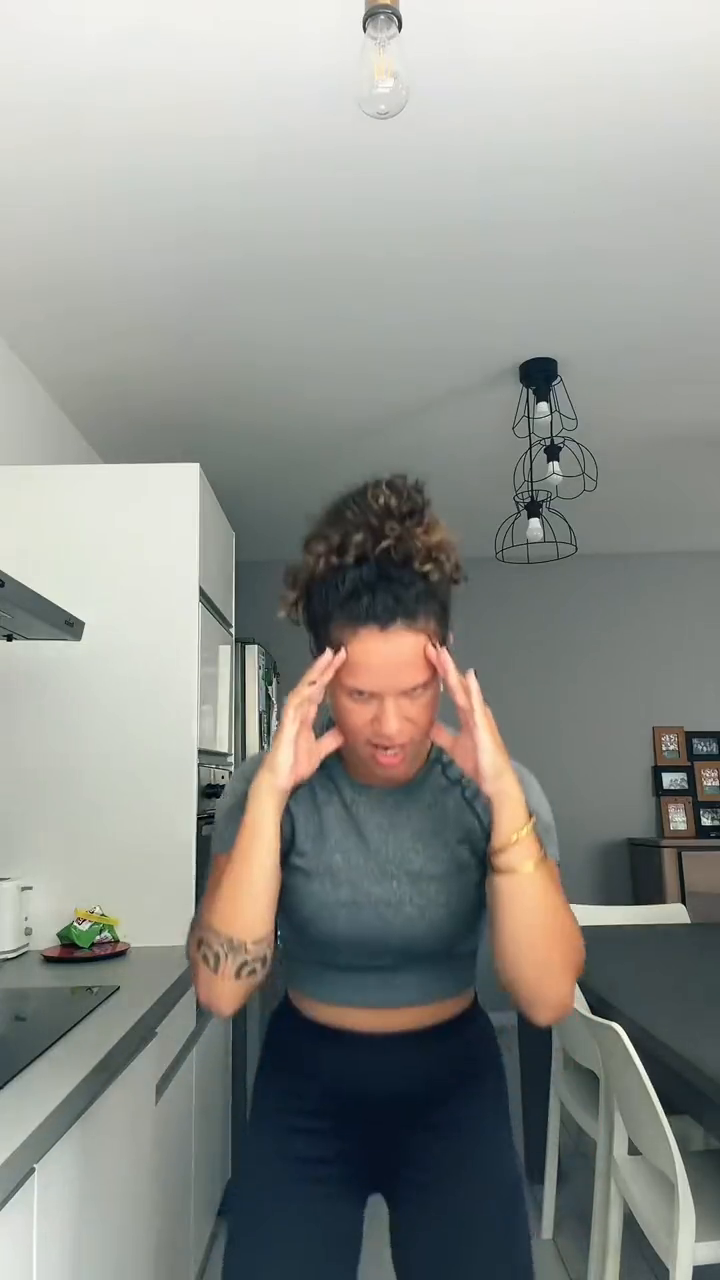
The BAD TIMES trend is one of the most explosive viral sensations across TikTok, Instagram Reels, and YouTube Shorts, racking up hundreds of millions of views worldwide. The trend centers around an energetic, comedic lip-sync choreography set to French electronic music producer Imael Angel's deep house anthem "Bad Times".
In this comprehensive tutorial, you will discover the cultural origins of the meme, why social algorithms reward this format, and how to use the Bad Times AI Video Generator to convert any single portrait of you, your dog, or your cat into a studio-grade, 15-second 9:16 vertical MP4 video in about 60 seconds.
What is the BAD TIMES Meme and Choreography?
The viral craze originated on TikTok when French creator @bouuhyachaka shared a dynamic comedic video with the caption "Ça va barder!!" (meaning "Things are going to get heated!"). The choreography matches the rhythmic stops and energetic drops of Imael Angel's electronic track with four unmistakable visual beats:
- Head in Hands: The subject rubs their temples or clutches their forehead in melodramatic exasperation.
- One Hand on the Hip: The subject pivots sideways with a theatrical glare directly toward the audience.
- "Hold On" Outstretched Palms: The subject extends both hands outward to the beat, visually commanding the viewer to halt.
- The Dramatic Lunge: The subject suddenly lunges close into the camera lens with intense facial expressions.
What turned a funny creator video into a global cultural phenomenon was the pet animation wave: creators began adapting the choreography to golden retrievers, bulldogs, tabbies, and kittens standing on their hind legs and waving realistic paws. Videos tagged under #BadTimes quickly soared past 450 million cumulative views.
Why the Format Dominates TikTok and Reels Algorithms
Short-form video recommendation algorithms—specifically TikTok's For You Page (FYP) and Instagram Reels Explore—rely heavily on three algorithmic metrics: 3-second watch-through rate, average percentage watched (retention), and loop rate. The Bad Times format is mathematically optimized for all three:
- Instant Pattern Recognition (0–3s): The distinctive deep house bassline and exasperated head-in-hands posture trigger immediate curiosity, preventing viewers from swiping away.
- Pacing and Anticipation (3–10s): The progression from hand-on-hip to the outstretched palms builds comedic tension that keeps audiences watching right up to the punchline.
- The Climactic Lunge and Seamless Loop (10–15s): The abrupt lunge at the 12-second mark delivers the climax, and the track's cyclical percussion smoothly transitions back into the opening bar, driving multiple replay loops.
How to Use the Bad Times AI Video Generator in 3 Simple Steps
Historically, creating a Bad Times video required hours of green-screen filming, manual 3D character rigging, or clunky CapCut cutouts that looked awkward and artificial. The Bad Times AI Video Generator solves this completely by using deep-learning generative vision models that synthesize realistic physical movement and facial lip-sync directly from a single 2D still photo.
Step 1: Upload a Front-Facing Portrait
Navigate to the Bad Times AI Video Generator online and upload your photo:
- Subject Clarity: Use a photo focusing on one primary subject—either a person or a pet.
- Front-Facing Angle: Choose an image where both eyes, nose, and mouth (or pet snout) face forward.
- Lighting: Bright, even indoor or daylight lighting delivers the highest facial landmark accuracy. Avoid harsh shadows, heavy color filters, or pixelated selfies.
- Accepted Formats: JPG, PNG, and WebP up to 10MB in size.
Step 2: Select the Tailored Animation Model
The generator provides two dedicated AI synthesis pipelines designed for biological fidelity:
-
Pet Version (Dogs, Cats & Puppies):
- Preserves natural fur texture, coat markings, whiskers, and breed proportions.
- Generates authentic animal paws that point, gesture, and press against the head rather than uncanny humanoid hands.
- Automatically postures four-legged pets onto their hind legs in an adorable, comical stance.
-
People & Babies Version (Adults, Toddlers & Friends):
- Locks facial geometry, hair texture, skin tone, and unique expressions without distortion.
- Synchronizes rhythmic lip movement to Imael Angel's exact vocal syllables.
- Re-creates full-torso upper body choreography with natural shoulder and wrist kinematics.
Step 3: Render, Preview, and Download Your 15s MP4
Click Generate Video to initiate the cloud rendering process:
- The generative engine computes depth maps, constructs a 3D skeletal mesh, and syncs lip animation to the official soundtrack in approximately 60 seconds.
- Once complete, you can stream the video immediately in the interactive web player.
- Download the clean, watermark-free 9:16 vertical MP4 video (1080×1920) directly to your phone or computer, ready for instant posting.
Choosing the Best Photo: Pet vs. People Preparation Guidelines
The quality of your output video depends directly on your input image. Follow these expert tips for optimal animation results:
For Dogs and Cats
- Neutral or Happy Expression: Photos of pets looking directly at the camera with their mouth slightly open or resting naturally produce the cleanest lip-sync alignment.
- Clear Paws and Chest: If possible, include the pet's upper chest so the AI can smoothly anchor the hind-leg stance.
- Avoid Busy Backgrounds: A solid wall or simple room backdrop helps the segmentation model isolate your pet cleanly from background objects.
For People and Toddlers
- Waist-Up Framing: While a close-up headshot works, a portrait framed from the chest or waist upward gives the AI the ideal canvas for animating the hand-on-hip and lunge movements.
- No Sunglasses or Face Obscurations: The generative model requires visible eyes, eyebrows, and mouth contours to drive expressive eye contact and sync.
Why Choose Bad Times AI Video Generator Over CapCut Templates?
Many creators initially experiment with free CapCut templates or manual video editing software before switching to a dedicated generative tool. Here is how they compare:
| Feature & Capability | Bad Times AI Video Generator | CapCut Video Templates | Traditional Video Editing |
|---|---|---|---|
| Input Requirement | 1 single photo (any person or pet) | Pre-recorded real video clips | Multiple camera angles + green screen |
| Pet Animation Quality | Authentic fur & real paws | 2D cutout of pet head on human body | Complex 3D puppet warp & keyframing |
| Turnaround Time | ~60 seconds automatic generation | 15–30 minutes manual timeline alignment | 2–4 hours in Premiere Pro or After Effects |
| Audio Synchronization | Perfect beat-matched lip-sync & lunge | Manual audio search & beat alignment | Manual keyframe trimming to audio waveforms |
| Watermark Policy | 100% clean, watermark-free output | Forced template or platform watermark | No watermark (requires $30+/mo software) |
| Cost & Pricing Model | $9.99 one-time credit pack (no recurring fee) | CapCut Pro subscription ($19.99/month) | $100+ per video to hire a freelance editor |
Publishing Strategy: How to Maximize Views on TikTok, Reels, and Shorts
Once your watermark-free Bad Times video is downloaded, use this battle-tested publishing routine to maximize organic reach:
- Link the Official Audio on TikTok: While your downloaded MP4 file already includes the high-definition Imael Angel track, select the official TikTok sound "Bad Times - Imael Angel" and set its volume to 0 or 100%. This ties your video to the trending audio page, driving traffic from users browsing the sound.
- Use Proven Viral Hashtags: Include
#badtimes,#badtimesai,#catsoftiktok,#dogsoftiktok, and#aivideoin your post caption. - Engage in the First 30 Minutes: Reply to the first comments quickly. Early comment velocity signals strong engagement to the algorithm, triggering broader distribution across FYP feeds.
Ready to see yourself or your pet star in the viral phenomenon? Launch the Bad Times AI Video Generator now and generate your first viral video!